
Documentation comparison · Sep 5, 2026
Workflow capture software vs. manual SOP documentation
Both methods can produce a reliable procedure. The practical difference is how they collect evidence, turn it into editable steps and support the next revision.
Start with the document, not the tool
A short procedure for a stable internal form may be easy to write manually. The author can perform the task, take a few screenshots, crop them, add numbers and place everything in a familiar editor. That direct approach is understandable, flexible and often enough for an occasional guide.
Workflow capture software becomes more useful when a process has many actions, changes frequently or must be documented repeatedly. It observes a real run and turns actions into draft steps with screenshots attached. The author still owns accuracy, wording and approval; the software changes the amount of mechanical assembly required.
Compare how evidence is collected
Manual documentation depends on the author remembering when to pause and capture each state. That can encourage careful selection, but it can also omit a transition or record a screen after the important state has disappeared. Authors may need to repeat the workflow just to recover a missing image.
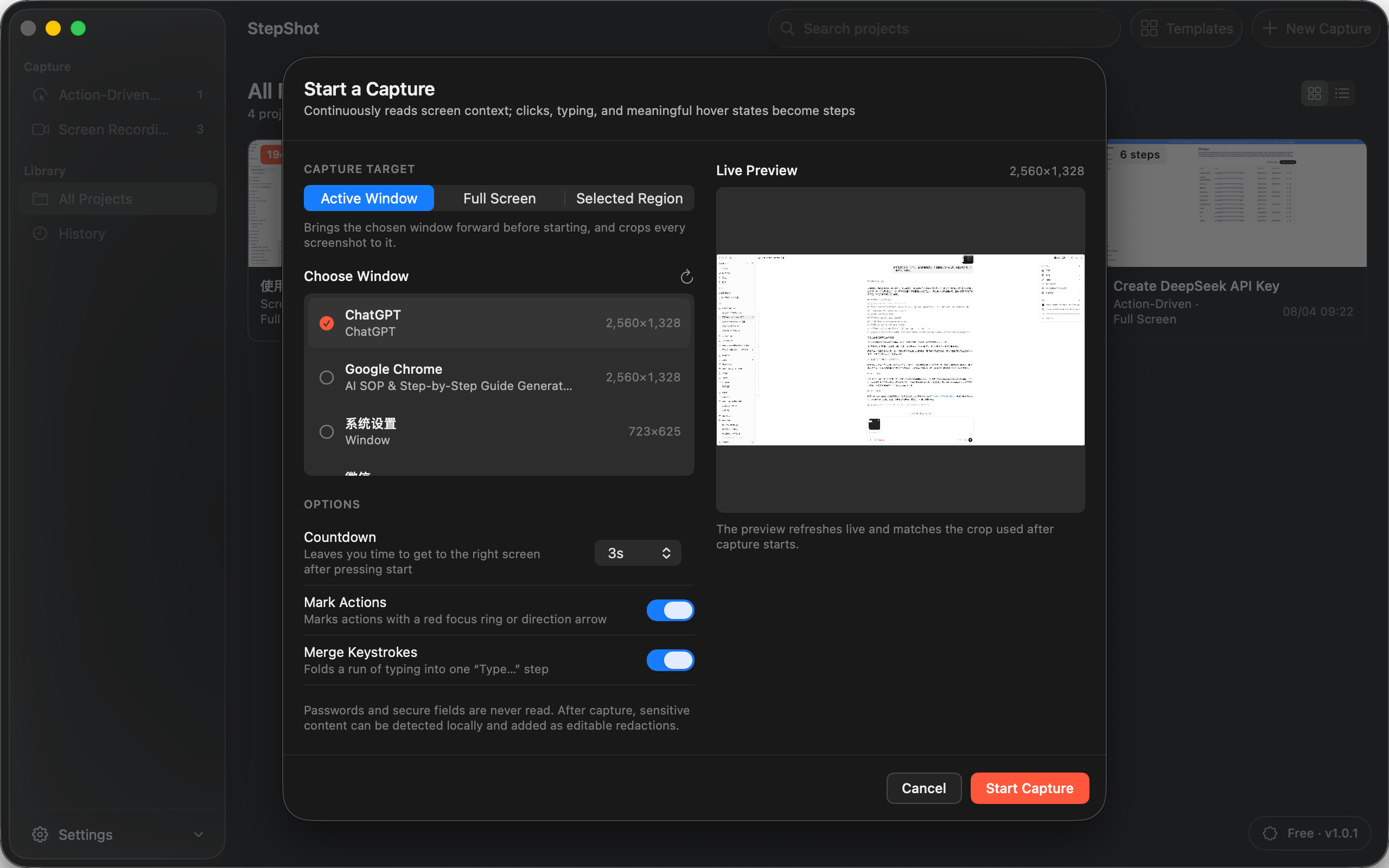
A capture tool records evidence while the task is performed. Useful systems should distinguish meaningful actions from incidental movement, keep enough context to explain each step and let the author restore something that was skipped. Continuous video can also help when a better frame or a missing step must be recovered later.
Compare editing and correction
General-purpose writing and image tools offer broad control, but the relationship between a numbered instruction, its screenshot and its annotation is usually maintained by hand. Inserting one step can mean renumbering several labels, moving images and checking page breaks again.
Purpose-built workflow documentation software keeps steps as structured items. Look for reorder, merge, skip, note and section controls, plus crop, highlight, arrow, text and redaction tools. The decisive question is not whether a draft is automatic; it is whether every suggestion and visual remains editable before publication.
Compare privacy review
Neither method makes screenshots safe by default. Manual authors must inspect names, email addresses, account identifiers, internal URLs, notifications and background windows. A capture tool should provide the same deliberate review and should make automatic detections visible instead of silently assuming they are correct.
Prefer redaction that changes exported pixels rather than placing a removable shape over the original detail. If a product offers cloud AI, check exactly what is sent, whether visual input is optional and where credentials are stored. A local editing workflow does not remove the need to verify the final exported file.
Compare maintenance, not just first publication
The real cost of an SOP often appears after the interface changes. In a manually assembled document, the source screenshots, annotations and layout may live in different files. Replacing one screen can disturb surrounding content or leave an old image attached to new text.
A structured project can make scoped updates easier because steps remain separate and reorderable. Even then, assign an owner, a review date or a change trigger. No capture product can know that an external policy, permission or business rule has changed unless a person checks it.
Compare the delivery format
Choose the authoring method only after deciding how readers need the result. PDF is useful for fixed layouts and print review. Markdown suits repositories and knowledge bases that manage images separately. Self-contained HTML can provide a portable browser document without a hosted publishing system.
Test the exact output rather than trusting the editing view. Check image clarity, links, headings, page breaks, narrow screens and print behavior where relevant. Also confirm entitlement boundaries before standardizing on a tool, especially when a free tier limits how many steps or which formats can be exported.
Where StepShot fits
StepShot for macOS 14 and later supports action-driven and screen-recording capture, then keeps the resulting steps editable. Authors can reorder, merge or skip steps, add notes and sections, adjust framing, annotate screenshots and review local pixel redaction before export. Capture and editing work locally by default.
StepShot exports PDF, Markdown and self-contained HTML. Free users can capture and edit without a time limit and export the first 10 captured steps; paid plans remove that step limit, while PDF and document branding are paid features. Optional cloud optimization uses an OpenAI-compatible endpoint configured by the user, sends text semantics by default and requires a separate opt-in for locally sanitized visual samples.
Use the feature overview to compare the editing workflow, read the capture guide for the two recording modes, and verify current boundaries on pricing. Manual documentation remains a sound choice for a small, stable procedure; workflow capture earns its place when repeatable evidence and maintainable steps matter more than a blank-page editing canvas.