
Product update · October 20, 2026
Publish StepShot tutorials to Google Drive
Save a reviewed tutorial to your own Drive account without first exporting a file and then uploading it by hand.
Connect with your Google account
Google Drive publishing is available in StepShot 1.0.7 for Mac. It adds a destination to the existing export workflow, so an approved tutorial can move from the local editor into My Drive. The connection is optional: recording, editing and saving projects still work without signing in to Google.
Open Settings → Integrations → Google Drive and choose Connect. Your browser opens the official Google authorization flow. Select the account you want to use and return to StepShot to check the connected account. Users do not need to register a developer application, upload a configuration file or enter a client ID.
Choose the document, then review what you send
In the editor, open Export, choose Google Drive as the destination, then select your format and step range. PDF and self-contained HTML upload as individual files. Markdown is packaged with its images in a ZIP, keeping those resources together for download and reuse. Files are saved to My Drive; this first release does not offer folder selection or shared-drive destinations.
The same export permissions and redaction review apply. Free exports include the first 10 captured steps; PDF and branded output require a paid license. Only the reviewed export is uploaded. StepShot does not upload the editable project, original recording or raw capture assets as part of this action.
See progress, cancel or retry
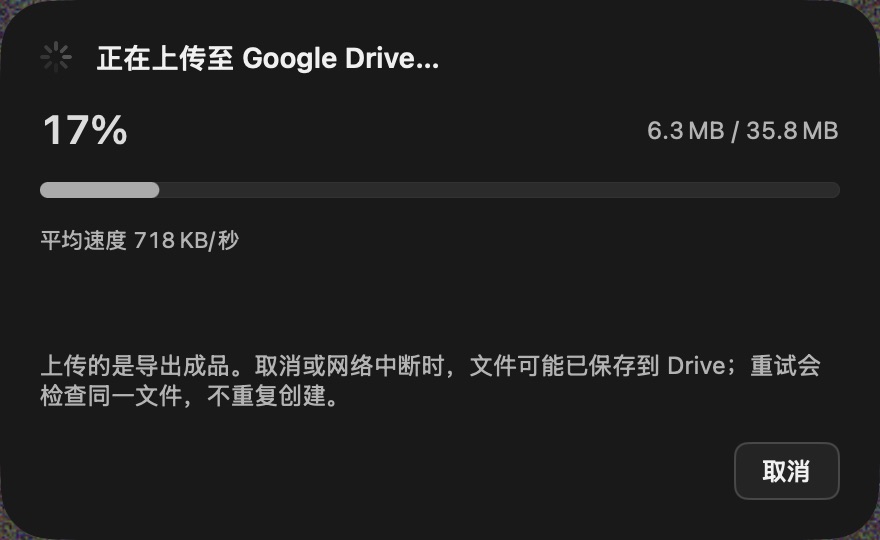
The upload window shows a progress bar, percentage, sent and total bytes, and average speed. It distinguishes preparation, transfer and waiting for Google confirmation. If no new bytes are sent for a while, a network hint helps you decide whether to wait or cancel. The app does not label a stalled transfer as a completed upload.
Cancel keeps the local tutorial intact. Retry in the same window checks the existing file identity before creating another upload, including when a response was lost after saving. Cancellation cannot undo a file that Drive has already saved. The connection is not project sync, and retries do not promise byte-level resume across application restarts.
Keep sharing under your control
StepShot uses the drive.file permission and does not automatically make an upload public. After success, open the saved file in Drive and manage access there. Disconnecting in StepShot removes local connection credentials without deleting uploaded files. Get the release from Downloads, review privacy details, or read the 1.0.7 overview.